Stop losing money, sleep, and sanity planning events in WhatsApp.
One workspace. From first inquiry to last guest out the door.
DJ just texted — hasn't received deposit. Need to pay now or he takes another gig.
Aunty Ngozi added 12 more guests. Says they are "important family members" from the village.
Mama J says the Jollof Rice is finished. People are still on the line. We need 2 more bags of rice ASAP.
The calm after the WhatsApp chaos
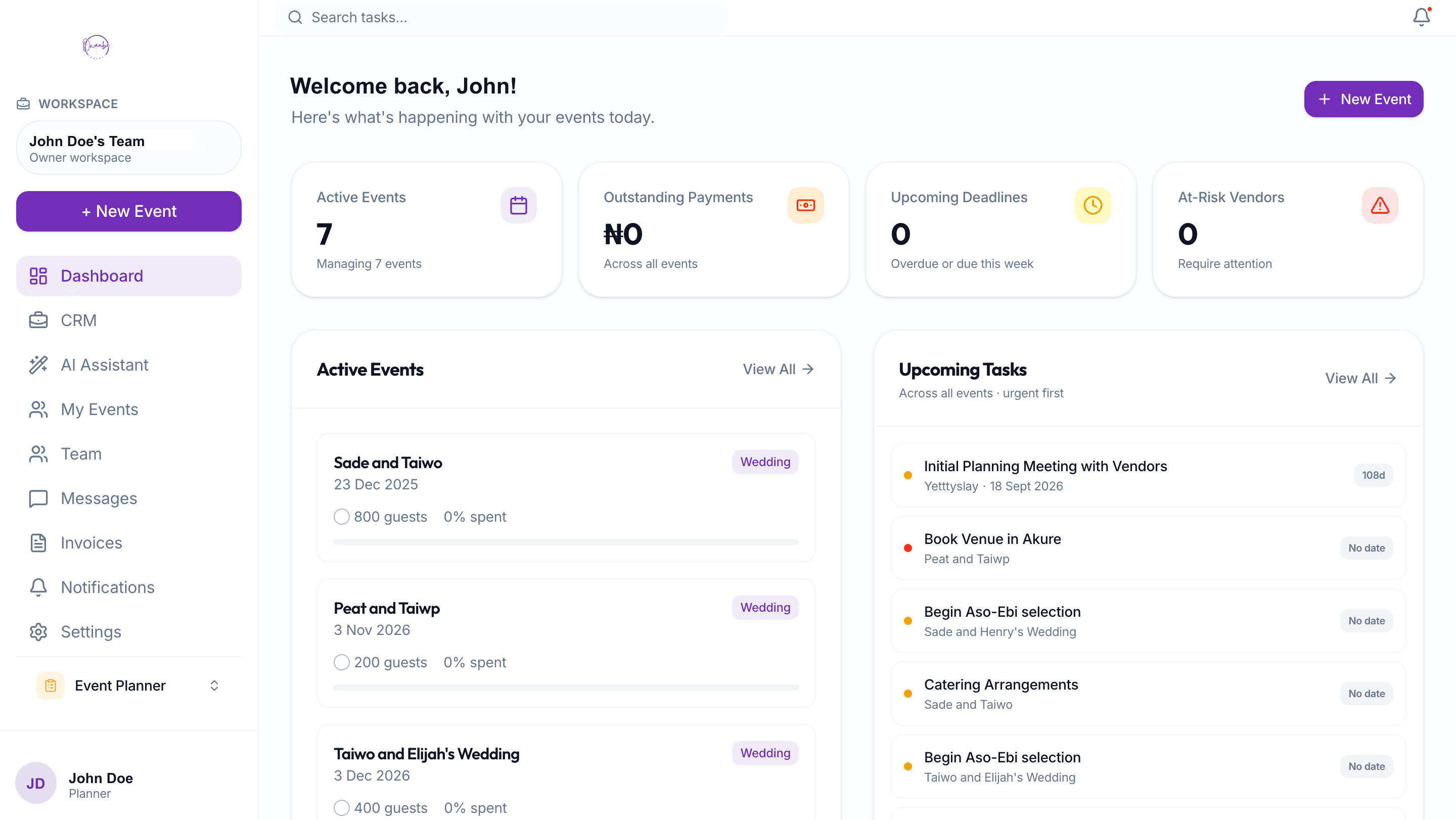
Three events running at once, and nothing is on fire.
Active events, urgent tasks, payments, and team handoffs stay visible before they turn into another midnight voice note.
Before the booking
Every inquiry arrives with the details you need.
Date, location, guest count, budget range, and source are captured before you start chasing the client.
During planning
Your team works from the same event truth.
Tasks, vendors, payments, timelines, invoices, and updates sit together instead of across sheets and chats.
When clients ask
They check the portal before calling you.
Status, decisions, vendor confirmations, timeline, and key contacts are available without exposing your margins.
Client intake
Your inquiry link becomes your front desk
Put one professional link in your bio. Every inquiry lands in your Owanbe CRM with date, location, guest count, budget, and event type already structured.
Never lose a high-paying lead to a crowded inbox.
When a client wants to pay you millions, the first interaction should not be a messy WhatsApp thread. Owanbe replaces chat chaos with a professional intake flow, then turns the right lead into a full event workspace.
- 1
The Old Way
"Hello, I need a planner for December." You spend two days chasing date, budget, location, and guest count before knowing if the lead is serious.
- 2
The Owanbe Way
They click your link, share the important details, and you respond with context. Serious leads move into proposal, invoice, and event delivery.
Everything your planning business needs in one place.
From first inquiry to event-day execution, Owanbe keeps the business side and the planning side connected.
The planner desk
One place to bring the client in, then run the event properly.
Capture client inquiries
Your Instagram, WhatsApp, website, and referral link all feed one client pipeline before a booking becomes an event.
Active event
Tasks, vendors, budgets
The real planning work lives beside the client record, not inside a scattered folder.
Client view
Portal, not pressure
Clients see progress, decisions, and contacts without seeing your private costs.
What stays organized
Vendor payments
Deposits, balances, and payment alerts stay tied to the event they belong to.
Shared vendor timeline
Everyone works from one schedule, so decorator, caterer, MC, and DJ stop hearing different instructions.
Team collaboration
Bring assistants and coordinators into the workspace with the context they need to help.
What changes
Your clients feel handled. Your team sees the plan. Your business looks premium.
Owanbe is not just another checklist. The real offer is control: fewer scattered messages, clearer client decisions, and a professional system behind every event.
Before Owanbe
Client details buried in WhatsApp
Vendor balances tracked from memory
Approvals scattered across voice notes
Team members asking for the latest update
After Owanbe
Inquiry, proposal, invoice, and event stay connected
Vendor payments and timelines sit beside the plan
Clients answer decisions inside a portal
Your team works from one shared workspace
One event workspace.
One simple fee.
For each premium event, get the full planning workspace your team and client can use from inquiry to event day. Starting is free.
Premium Event Workspace
Add the workspace when an event needs serious coordination, client updates, and team visibility.
Everything included:
- Client intake and CRM pipeline
- Event dashboard for tasks, vendors, timelines, and payments
- Team workspace for assistants and coordinators
- Client portal for updates and approvals
- Vendor payment tracking
- AI assistant for summaries, drafts, and planning checks
Built around the planner's daily pressure.
Stop losing serious leads in scattered DMs
Put one intake link on Instagram, WhatsApp, your website, and referrals so every serious inquiry lands in your CRM before it becomes another forgotten chat.
Keep assistants aligned without repeating yourself
Keep assistants, coordinators, and event-day staff aligned on the same tasks, timelines, updates, vendor notes, and client context.
Reduce the "how far?" calls
Your clients can check status, decisions, contacts, and timelines themselves without seeing your pricing, margins, or internal process.
The questions planners ask before switching.
Is setup heavy?
No. Start with one event, add vendors and tasks gradually, then invite your team when the workspace is ready.
Will this eat my fee?
No. Treat the premium upgrade as a client-facing digital event management fee, separate from your planning fee.
Will clients see costs?
No. The client portal shows progress, decisions, and contacts, not your internal budget, margin, or negotiation details.